ADA Website Compliance Checklist: 12 Steps to an Accessible Website
Table of Contents
- ADA Website Compliance Checklist: 12 Steps to an Accessible Website
- What Is ADA Website Compliance?
- Who Needs an ADA Compliant Website?
- What Non-Compliance Costs
- The ADA Website Compliance Checklist: 12 Checks
- The Six Errors to Fix First
- How to Test Your Website
- Why an Overlay Widget Is Not Enough
- Keep Your Site Compliant
- Start With an Audit
- Frequently Asked Questions
Most websites still shut out people with disabilities. WebAIM’s 2026 analysis of the top one million home pages found detectable WCAG failures on 95.9% of them, with an average of 56.1 errors per page. The legal exposure is growing too. Plaintiffs filed 3,117 website accessibility lawsuits in federal court in 2025, up 27% from the year before.
The encouraging part is that the same few problems cause most of the errors. This ADA website compliance checklist covers what the law expects, 12 checks to run on your site, and the fixes to make first.
What Is ADA Website Compliance?
ADA website compliance means your website can be used by people with disabilities, including people who rely on screen readers, keyboard navigation, captions, or screen magnification. The Americans with Disabilities Act prohibits disability discrimination, and the Department of Justice has long held that this covers what businesses and governments offer on the web.
For private businesses, no regulation spells out a technical standard. The DOJ web accessibility guidance points to the Web Content Accessibility Guidelines (WCAG) and the Section 508 standards as references. WCAG is organized around four principles: content must be perceivable, operable, understandable, and robust. In practice, WCAG Level AA is the benchmark that settlements and auditors use. State and local governments do have a set standard: WCAG 2.1 AA under the ADA Title II rule. This guide is general information, not legal advice.
Who Needs an ADA Compliant Website?
- Businesses open to the public (Title III): retailers, restaurants, hotels, banks, healthcare providers, and online stores.
- State and local governments (Title II): cities, counties, school districts, public universities, and special districts.
- Software vendors that sell to government: buyers ask for a VPAT or Accessibility Conformance Report under Section 508.
What Non-Compliance Costs
A demand letter or lawsuit brings legal fees, a settlement, and a remediation deadline set by someone else. There is a commercial cost as well. Visitors who cannot complete a form or a checkout leave, and accessible pages tend to be easier for everyone to use, including people on phones and older devices. Fixing barriers on your own schedule costs less than fixing them on a court timeline, and it lets you plan the work around your normal release cycle.
The ADA Website Compliance Checklist: 12 Checks
Work through these on your key templates: the home page, navigation, a product or service page, forms, and the checkout or contact flow.
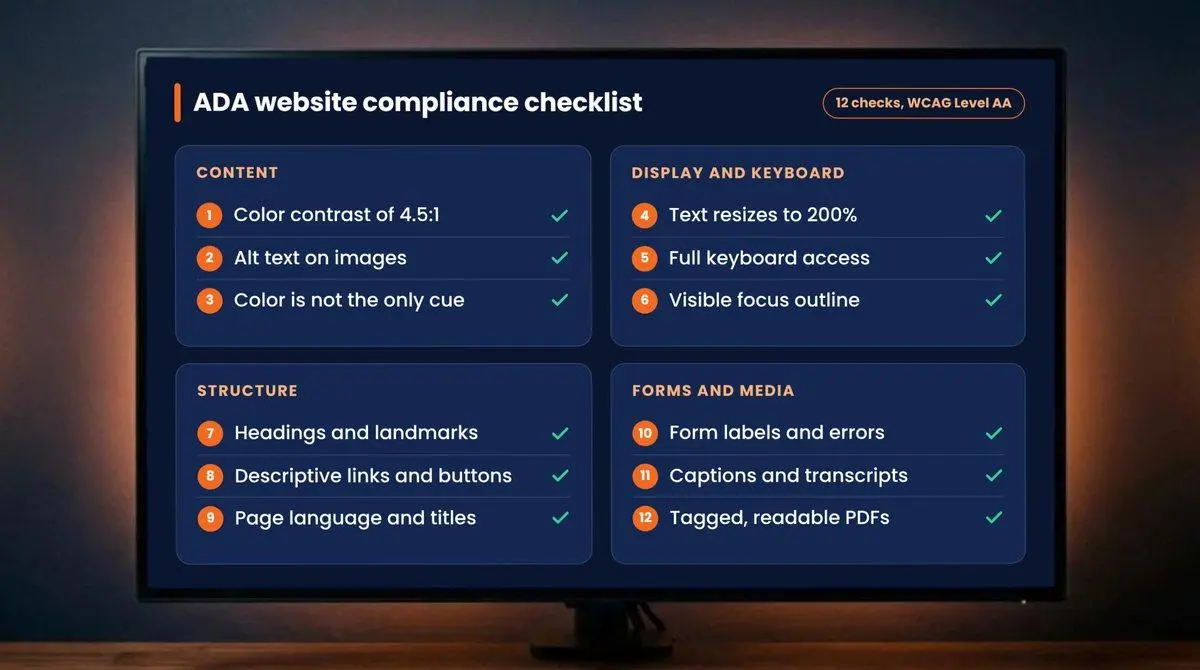
- Color contrast. Body text has a contrast ratio of at least 4.5:1 against its background, and large text at least 3:1.
- Alt text. Every meaningful image has a text alternative that describes its purpose. Decorative images have an empty alt attribute.
- Color is not the only cue. Errors, required fields, and chart data use text or icons as well as color.
- Resizable text. Content stays readable and usable when zoomed to 200% and on small screens.
- Keyboard access. Every link, button, menu, and form works with the keyboard alone, with no traps.
- Visible focus. A clear outline shows which element is selected as users tab through the page.
- Headings and structure. Each page has one H1, headings in logical order, and landmarks for the header, navigation, main content, and footer.
- Descriptive links and buttons. Link text makes sense out of context, and icon buttons have accessible names.
- Page language and titles. The HTML lang attribute is set, and every page has a unique, descriptive title.
- Form labels and errors. Each field has a visible label tied to the input, and error messages explain the problem in text.
- Captions and transcripts. Videos have accurate captions, and audio content has a transcript.
- Accessible documents. PDFs and other downloads are tagged, follow a logical reading order, and work with screen readers.
The Six Errors to Fix First
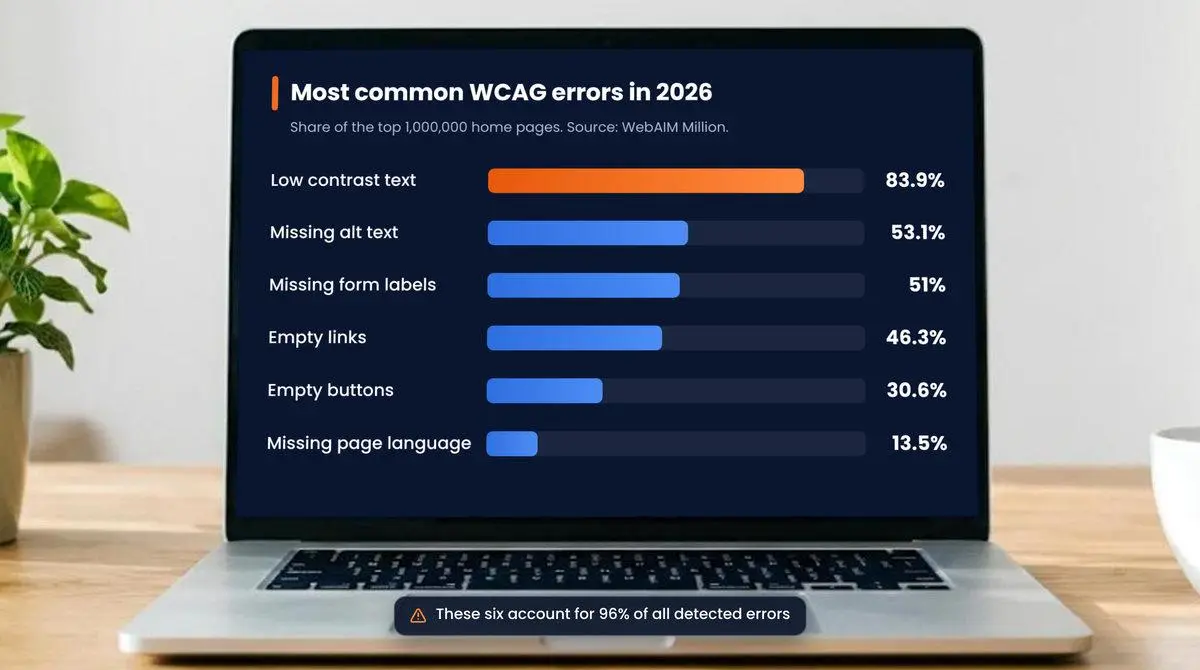
WebAIM found that six error types account for 96% of all detected errors. If time is short, start here.
| Error | Home pages affected | Fix |
|---|---|---|
| Low contrast text | 83.9% | Darken text or adjust background colors |
| Missing alt text | 53.1% | Describe every meaningful image |
| Missing form labels | 51% | Tie a label to every input |
| Empty links | 46.3% | Add link text or an accessible name |
| Empty buttons | 30.6% | Name icon-only buttons |
| Missing page language | 13.5% | Set the lang attribute |
Most of these are template issues, so one fix in the theme or component library repairs every page that uses it. Good UI/UX design prevents most contrast and labeling problems before development starts.
How to Test Your Website
No single tool confirms compliance. Use these methods together.
- Run an automated scan. Tools such as axe and WAVE flag contrast, alt text, and label errors in minutes. They catch only part of the WCAG failures on a page.
- Test with the keyboard. Tab through each key page and complete a form without touching the mouse.
- Test with a screen reader. Use NVDA or JAWS on Windows and VoiceOver on Apple devices to hear what users hear.
- Review against WCAG. Check each template against the Level AA success criteria and log every issue with its location and severity.
- Repeat on mobile. Run the same checks on a phone with the built-in screen reader and at larger text sizes.
A professional website accessibility audit, often called an ADA compliance audit, combines these methods and gives developers a prioritized fix list.
Why an Overlay Widget Is Not Enough
Accessibility overlays are scripts that add a toolbar and try to patch problems in the browser. They do not repair the underlying code, so keyboard traps, unlabeled fields, and untagged PDFs remain. Fixing the source is the reliable route to an ADA compliant website. Accessibility remediation corrects the templates, components, and content, then retests them.
Keep Your Site Compliant
Accessibility slips every time new content or features go live. Build it into routine work:
- Train content editors to write alt text, use headings, and upload accessible documents.
- Add accessibility checks to design reviews and code releases.
- Rescan monthly and run manual spot checks each quarter.
- Publish an accessibility statement with a way to report barriers.
Start With an Audit
A checklist shows where you stand. An audit tells you exactly what to fix and in what order. Plego’s ADA compliance services map every issue to a WCAG 2.2 AA success criterion, score its severity, and cover the remediation work and a retest. Contact us for a free page scan and scoping call.
Frequently Asked Questions
What is ADA website compliance?
ADA website compliance means a website can be used by people with disabilities, including people who use screen readers, keyboards, captions, or magnification. In practice, it is measured against the Web Content Accessibility Guidelines (WCAG) at Level AA.
Is ADA compliance mandatory for websites?
The Department of Justice’s position is that the ADA applies to the websites of businesses open to the public and of state and local governments. Private businesses have no set technical regulation, but WCAG Level AA is the common benchmark. Governments must meet WCAG 2.1 AA under the Title II rule.
What WCAG level is required for ADA compliance?
Level AA is the accepted target. The ADA Title II rule names WCAG 2.1 Level AA for state and local governments. Many organizations now test against WCAG 2.2 AA, the newer version, which includes the 2.1 criteria.
How do I check if my website is ADA compliant?
Combine an automated scan, keyboard-only testing, screen reader testing, and a manual review against WCAG Level AA. Automated tools alone find only part of the issues, so a manual audit is needed for a reliable answer.
How much does it cost to make a website ADA compliant?
It depends on the number of page templates, the complexity of forms and custom components, and how many PDFs and videos need work. An audit sets the scope so the fixes can be estimated accurately before work begins.
Do accessibility overlays make a website ADA compliant?
No. Overlays add a toolbar and attempt automated patches in the browser, but they do not fix the underlying code. Barriers such as keyboard traps, unlabeled form fields, and untagged documents remain until the source is corrected.
How often should a website be audited for accessibility?
Run a full audit after a redesign or major release and at least once a year. Between audits, run monthly automated scans and quarterly manual spot checks so new content does not reintroduce barriers.